
Menus
A Labrador menu is a state with a scene of widgets in it and a focus group that knows which widget the cursor is on. The engine solves the two things every controller-driven menu needs, focus and moving between widgets with a stick or d-pad, and leaves the layout, the look and what each choice does to your game.
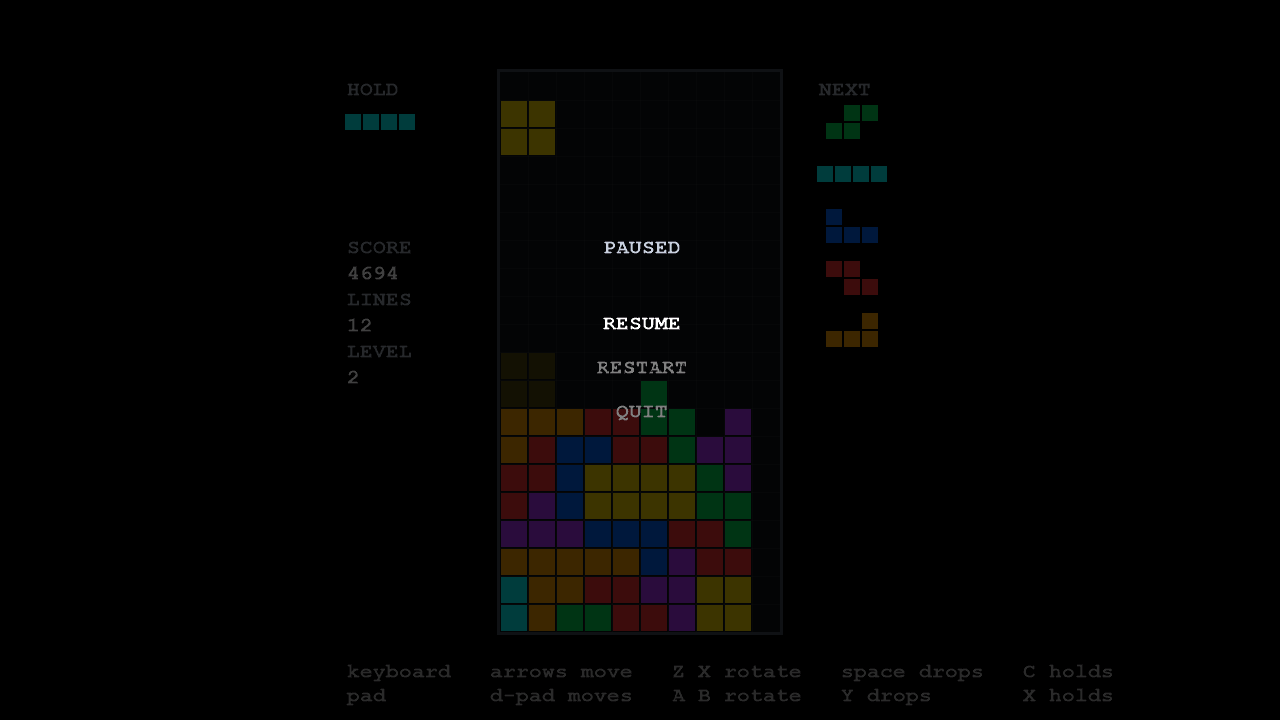
This guide follows LineSweeper’s pause menu,
states/pause_state.cpp:
three rows, Resume, Restart and Quit, over the dimmed game.
The widgets
Section titled “The widgets”Widgets are game objects, so they go in a scene like anything else. The engine’s set is small:
| Widget | What it is |
|---|---|
UiText |
A line of text. |
UiTextDropShadow |
A line of text with a shadow. |
UiTexture |
A frame from a sprite sheet, in a rectangle. |
UiContainer |
A widget holding other widgets, so a compound row can be one thing. |
Each takes a name first, which is how a container finds a child. The set is small because it is open: a widget is a class you can derive from, and a game’s own widgets (a slider, a row with a label and a value) are classes the game writes.
There is no layout engine. You position widgets yourself. The pause menu measures each row’s text and centres it, as the Sprites and text guide shows.
The focus group
Section titled “The focus group”A FocusGroup holds the widgets the cursor can land on, each with the action that runs when it is
chosen. The pause menu adds its three rows, and each action pops the menu with its answer:
for (int index = 0; index < 3; ++index){ const std::wstring text = rows[index].text; const PauseChoice choice = rows[index].choice;
"row", text, font_name, centred(text, first_row_y + static_cast<float>(index) * row_spacing), resources));
this->focus_.add(row, [this, choice]() { this->context()->pop(choice); });}samples/linesweeper/states/pause_state.cpp, lines 148–163 at 862e08b
Popping from inside an action is safe: the action runs inside the menu’s update(), and the stack
waits for that to return before it destroys the menu.
The group colours its widgets to show focus: white for the focused one, grey for the rest, dark
grey for one that is disabled. Pass a FocusStyle to the constructor for other colours, and call
set_enabled(widget, false) to grey out a choice that is not available.
Moving and choosing
Section titled “Moving and choosing”Each step the menu turns input into a direction, moves the focus, and activates on confirm:
void PauseState::update(float dt){ // Cancel first, so that the key which opened the menu closes it // whatever the cursor is on. A player who paused by accident should not // have to read three rows to get back. if (this->cancel_pressed()) { this->context()->pop(PauseChoice::resume); return; }
this->repeat_.update(this->held_direction(), dt);
if (direction != Direction::none) { // The return value is "focus actually moved", which is the signal a // cursor sound hangs on (focus.h). This sample has no audio, so it // is deliberately ignored rather than plumbed to nothing. this->focus_.move(0, direction); }
if (this->confirm_pressed()) { this->focus_.activate(0); }
// The scene still ticks: nothing here animates today, and a menu that // stopped updating its own widgets would be the shape a later one has // to undo. this->scene_->update(dt); this->scene_->end_tick();}samples/linesweeper/states/pause_state.cpp, lines 222–254 at 862e08b
move(slot, direction) finds the nearest widget in that direction by looking at where the
widgets are on screen, not at the order they were added. A grid of buttons, a column and a row
all navigate correctly with no extra code, and by default moving off one edge wraps to the other.
move returns whether the focus actually moved, which is when a menu would play a cursor sound.
activate(slot) runs the focused widget’s action, and reports whether it ran, or was refused
because the widget is disabled.
Directions come from DirectionRepeat, which turns a
held stick or key into one move at once and then repeated moves, the way menus in console games
behave. The pause menu handles cancel first, so the button that opened the menu always closes it,
whatever the cursor is on.
A menu that answers
Section titled “A menu that answers”The pause menu returns its choice the way any pushed state does, as a typed result:
enum class PauseChoice{ resume, restart, quit,};samples/linesweeper/states/pause_state.h, lines 50–55 at 862e08b
and the play state that opened it decides what each answer means:
void PlayState::open_pause_menu(){  this->context()->push<PauseChoice>(    std::make_unique<PauseState>(this->app_),    [this](const PauseChoice& choice)    {      switch (choice)      {      case PauseChoice::restart:        // The same one line the top-out restart is, reached from a        // menu instead of from a key. There is no reset() here        // either - README, The match is one value.        this->world_ = World{};        break;
      case PauseChoice::quit:        this->app_->quit();        break;
      case PauseChoice::resume:      default:        break;      }    });}
samples/linesweeper/states/play_state.cpp, lines 211–235 at 862e08b
Because the menu only reports a choice, the same menu could be opened from anywhere that wants those three answers.
Drawing over the game
Section titled “Drawing over the game”The pause menu says covers_screen() is false, so the match keeps drawing underneath it, and its
first object is a full-screen rectangle of translucent black that dims the match. Its scene is
drawn after the match’s, so it draws on top. See
Drawing over the world.
Split-screen menus
Section titled “Split-screen menus”FocusGroup takes a number of slots, one per player, and every call names the slot it is
for. Each player has their own cursor in the same group, which is what a character-select screen
needs. The pause menu is single-player and uses slot 0 throughout.
Development documentation (unreleased). Built from Labrador 862e08b of 2026-10-08.