
Examples
The repository has five samples. They answer different questions, so they are kept separate: the minimal sample is what you copy to start a game, and LineSweeper is what you read to see what a finished one looks like. Three focused examples teach collision, audio and local multiplayer. All build with the engine.
The minimal sample: the one you copy
Section titled “The minimal sample: the one you copy”samples/minimal is about 450 lines, comments included. It opens a 1280×720 window with a line
of text that circles a point you move with a gamepad stick, the arrow keys or WASD. Press B or
Escape and it asks, in a second screen on top of the first, whether you really want to quit.
That is small, but it is a complete game on the engine. It has a first state, a second state pushed on top that returns a result, a scene that owns what is on screen, input from two kinds of device, content named in a manifest, and the build file that copies that content beside the executable.
| File | What it shows |
|---|---|
main.cpp |
Window options, loading the content manifest, and handing the engine its first state. |
states/hello_state.cpp |
A scene with two labels and one view, input from a pad and a keyboard at once, and a transform built each frame. |
states/confirm_state.cpp |
A state pushed above another that hands a bool back when it closes. |
content/manifest.json |
The one font the sample uses, named once and resolved to a handle at load. |
CMakeLists.txt |
The whole build file: sources, two libraries, and the content copied beside the executable. |
This is how the minimal sample asks before quitting. The question is a state of its own that knows nothing about the screen below it, and the answer comes back once, when it closes:
{ // Ask, rather than quit. The result type is named here and matched // at the pop; the question knows nothing about this state, and the // callback runs once, when it closes, rather than being a flag read // on every frame until something sets it. this->context()->push<bool>( std::make_unique<ConfirmState>(this->app_, L"Really quit?"), [this](const bool& quit) { if (quit) { this->app_->quit(); } }); return;}samples/minimal/states/hello_state.cpp, lines 123–139 at 862e08b
LineSweeper: the one you read
Section titled “LineSweeper: the one you read”samples/linesweeper is a falling-block game with seven pieces, a next queue, a hold slot, hard
drop, wall kicks, T-spins and back-to-back scoring, and a field of up to ten thousand particles
that bursts when a piece locks, when lines clear and when the game ends. It is about 4,000 lines,
with about 2,000 more of tests, and it is there to show what a whole game on Labrador looks like
and what it costs.
Read a description of the video
Coloured pieces turn and slide into a falling-block well. Completed rows disappear, throwing matching sparks sideways as the score and line count rise. The hold slot keeps one piece in reserve, and the next five pieces appear beside the board. Later the stack reaches the top: a “TOPPED OUT” banner appears and thousands of coloured particles burst across the screen, then fade. The game has no sound or spoken commentary.
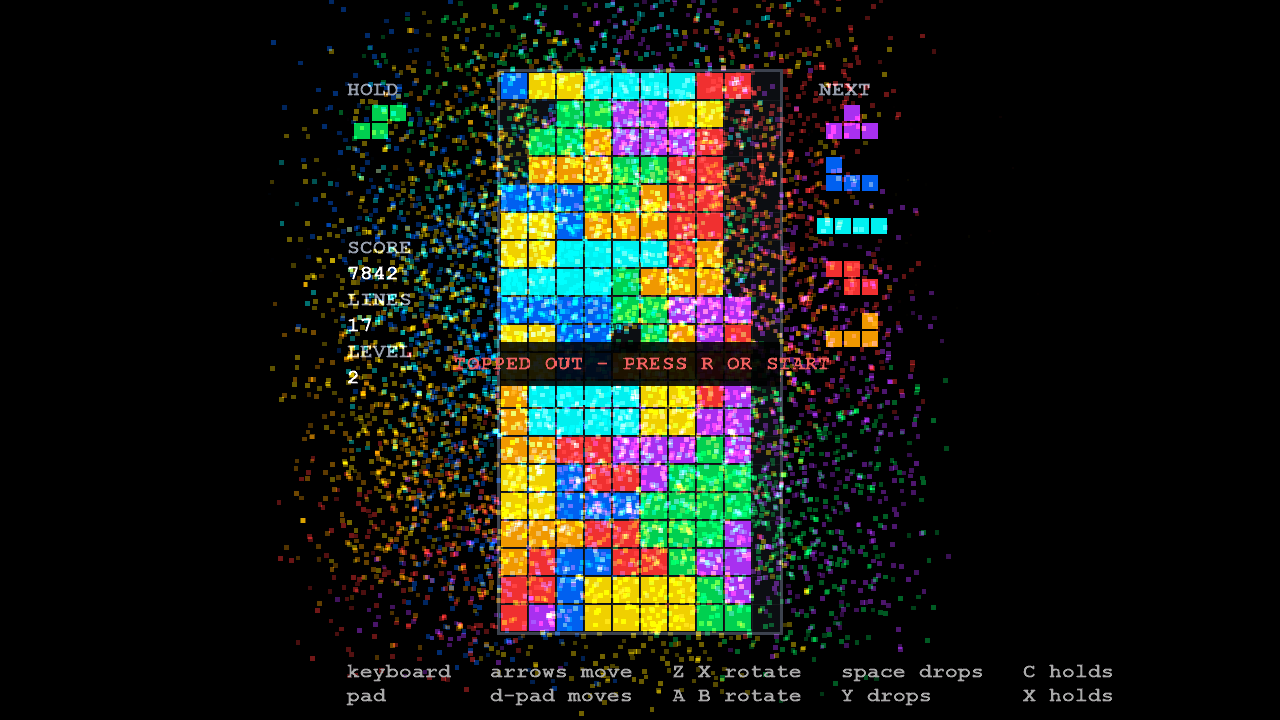
It is built in three layers, and the walls between them are the point:
rules/, the simulation: a static library that links nothing from the engine, so the whole game can be played and checked inside the test suite with no window.presentation/reads a match and draws it. It may read the rules’ data but may not call the functions that change it.states/is the only layer that sees both, and where key presses become moves.
Start with its design notes. They record every decision in the sample with its reasons, including the ones that went the other way. Then read the code in this order:
rules/world.h: the whole match as one 276-byte value, and the four compile-time checks that keep it one.rules/tick.h: the one function that advances the game by a step.tests/linesweeper/replay_tests.cpp: whole matches played, recorded and replayed with no window.presentation/particles.h: ten thousand particles behind one game object.states/play_state.cpp: keyboard and gamepad bindings, and the frame that ties the layers together.
Controls
Section titled “Controls”| Action | Keyboard | Gamepad |
|---|---|---|
| Move | Left, Right | D-pad left, right |
| Soft drop | Down | D-pad down |
| Hard drop | Space | Y |
| Rotate clockwise | Up or X | D-pad up or A |
| Rotate anticlockwise | Z | B |
| Hold | C or Shift | X or left shoulder |
| Pause | Escape or P | Start |
| Restart after the game ends | R | Start |
From the binding tables in states/play_state.cpp.
Focused guide examples
Section titled “Focused guide examples”Each example comes with a guide quoting its source, a README with controls, and automated checks of the behavior it teaches.
| Sample | What to try | Guide |
|---|---|---|
| Collision | Move into a wall, pass through masked geometry and enter a trigger. | Collision |
| Audio | Play original tones from a named sound bank and control a looping instance. | Audio |
| Local multiplayer | Move two players in a shared world through two following cameras, with WASD and arrows or two gamepads. | Local multiplayer |
Running them
Section titled “Running them”All samples build with the engine. After building Labrador, they are at:
out\build\x64-debug\samples\minimal\MinimalSample.exeout\build\x64-debug\samples\linesweeper\LineSweeperSample.exeout\build\x64-debug\samples\collision\CollisionSample.exeout\build\x64-debug\samples\audio\AudioSample.exeout\build\x64-debug\samples\local_multiplayer\LocalMultiplayerSample.exeEach copies its content beside its executable, so you can start it from anywhere.
Development documentation (unreleased). Built from Labrador 862e08b of 2026-10-08.