Skip to content

Labrador

A 2D game engine for developers who want to write games in ordinary C++, and understand the machinery beneath them.
  • Windows today
  • C++20, built with CMake and vcpkg
  • Direct3D 11, Direct3D 12, OpenGL 3.3 and Vulkan renderers
  • MIT licence
  • Early: no versioned releases yet
A complete scripted match. 35 seconds, no sound. Download the MP4.
Read a description of the video

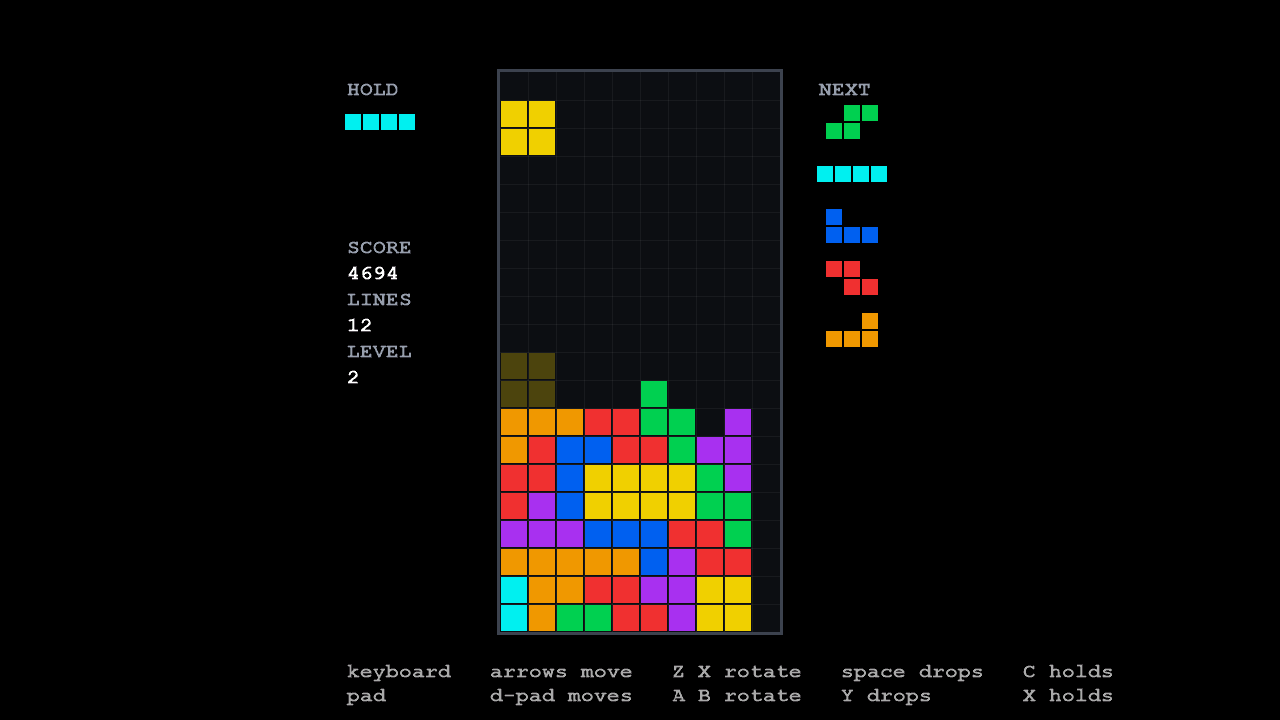
Coloured pieces turn and slide into a falling-block well. Completed rows disappear, throwing matching sparks sideways as the score and line count rise. The hold slot keeps one piece in reserve, and the next five pieces appear beside the board. Later the stack reaches the top: a “TOPPED OUT” banner appears and thousands of coloured particles burst across the screen, then fade. The game has no sound or spoken commentary.

LineSweeper mid-game: a falling-block well two-thirds full of coloured blocks, a hold slot, a queue of five next pieces, and the score, lines and level.
A match in progress.
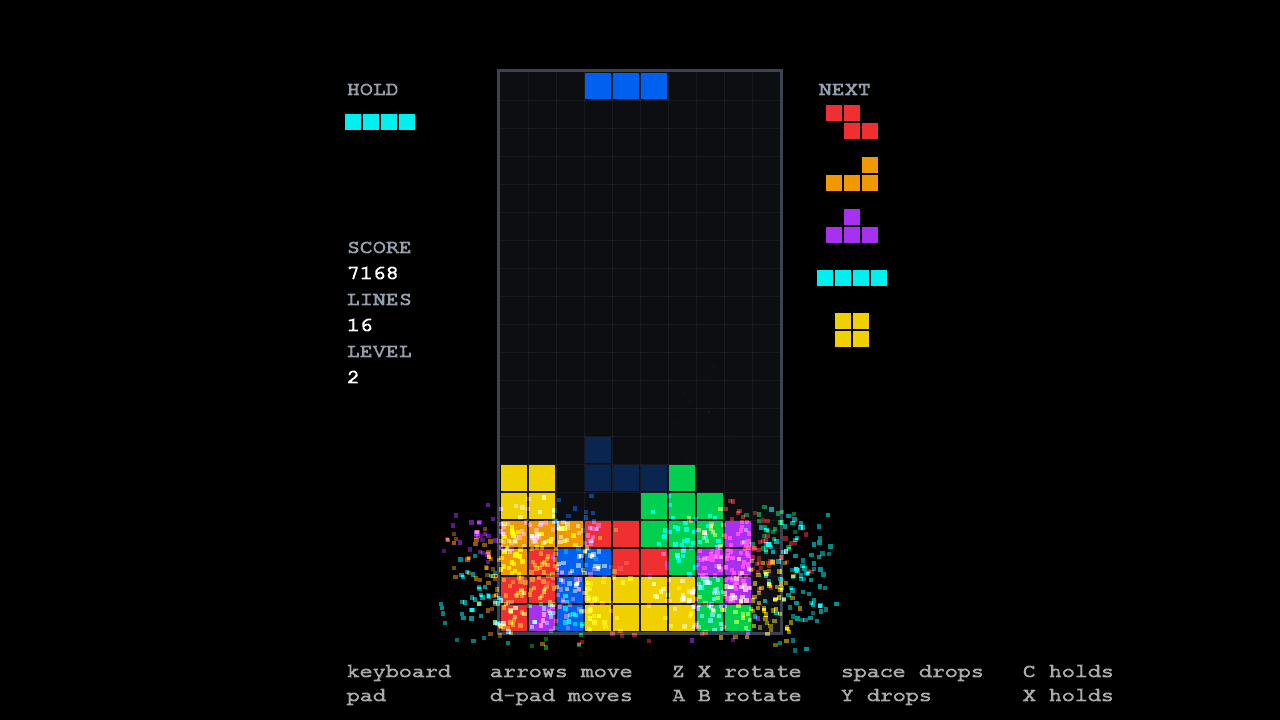
LineSweeper a few frames after clearing four lines: sparks in each block's colour burst sideways out of the well.
Four lines cleared, eight frames later: about nine hundred sparks from a field of up to ten thousand.

Watch the pieces lock, the rows clear and the sparks fade. The stills below the video are exact frames read back from the graphics device; the video is compressed for playback. The Examples page says how the game is built.

Labrador is a small engine with firm opinions. Each one below helps some games and gets in the way of others, so each comes with its price.

Ordinary C++ and standard tools

A game is a C++ program that links two static libraries. Its build file is a dozen lines of CMake. There is no project format, no code generator and no macro dialect between your source and the compiler.

The cost: all behaviour is C++, and every change to it is a compile. There is no visual editor, no scripting language and no hot reload.

The full argument

Your data, your lifetimes

The engine meets a game at a few small interfaces, and what stands behind them is the game’s choice: one class per entity, or one object holding ten thousand particles in a flat array.

The cost: storage and ownership are your decisions. The engine does not manage objects for you, and those interfaces are virtual calls.

The full argument

Built for local 2D games

A scene can be drawn through several cameras into several viewports in one frame, which is what split-screen is. Gamepads come with deadzones, press edges and menu navigation.

The cost: online play and 3D are out of scope for good, not just for now.

The full argument

Rules you can test without a window

The falling-block sample keeps its whole game in a library that links nothing from the engine, so its tests play complete matches with no window and compare them byte for byte.

The cost: that separation is a design you choose and keep. The engine makes it possible; it does not make it automatic.

The full argument

This is main.cpp from the minimal sample, the project you copy to start a game. It names the window, loads the content and hands the engine a first state. Everything it leaves out belongs to the engine.

samples/minimal/main.cpp
int WINAPI wWinMain(_In_ HINSTANCE instance, _In_opt_ HINSTANCE, _In_ LPWSTR,
_In_ int show_command)
{
try
{
options.window_class_name = L"MinimalSampleWindowClass";
// ASCII only: this file gets copied into new projects, and a wide
// literal's encoding depends on how the compiler was told to read the
// source.
options.window_title = L"Labrador - minimal sample";
options.resolution = ScreenResolution::s_1280_720;
// One pane, so one view's worth of recording state. The default is four
// - four-player split-screen, the widest layout the engine has a client
// for - and every view above what a frame draws is a deferred context
// and a dynamic vertex buffer created at startup and never used.
// A game that fans out says so here; this one does not.
options.view_capacity = 1;
Application app(std::move(options));
app.initialize(instance, show_command);
// Everything this sample draws, named in content/manifest.json. A game
// with its own kinds of asset - levels, dialogue, whatever it has -
// teaches them to app.resource_loader() before this line.
//
// Beside the executable, wherever the executable was started from:
// a relative path here is relative to the game, not to the working
// directory (Application::load_manifest), and the build copies the
// content there.
app.load_manifest("./manifest.json");
return app.run(std::make_unique<HelloState>(&app));
}
catch (const std::exception& e)
{
// A broken contract stops the program dead with the reason on screen,
// never a silent abort (PHILOSOPHY T6).
fprintf(stderr, "startup failure: %s\n", e.what());
MessageBoxA(nullptr, e.what(), "Sample - startup failure",
MB_OK | MB_ICONERROR);
return 1;
}
}

Knowing these before you start will save you time.

  • Not cross-platform yet. It builds and runs on Windows only. The Vulkan renderer is the route to other platforms, but no other platform builds today.
  • Not an editor. Content is JSON and standard file formats, edited in a text editor. Behaviour is C++, edited in yours.
  • Not 3D, and not online. Labrador is for 2D games played on one machine: alone, side by side, or split-screen.
  • Not finished. There are no versioned releases yet, and the public API can still change. The design documents say where it is going.

Development documentation (unreleased). Built from Labrador 862e08b of 2026-10-08.