
Menus
A Labrador menu is a state with a scene of widgets in it and a focus group that knows which widget the cursor is on. The engine solves the two things every controller-driven menu needs, focus and moving between widgets with a stick or d-pad, and leaves the layout, the look and what each choice does to your game.
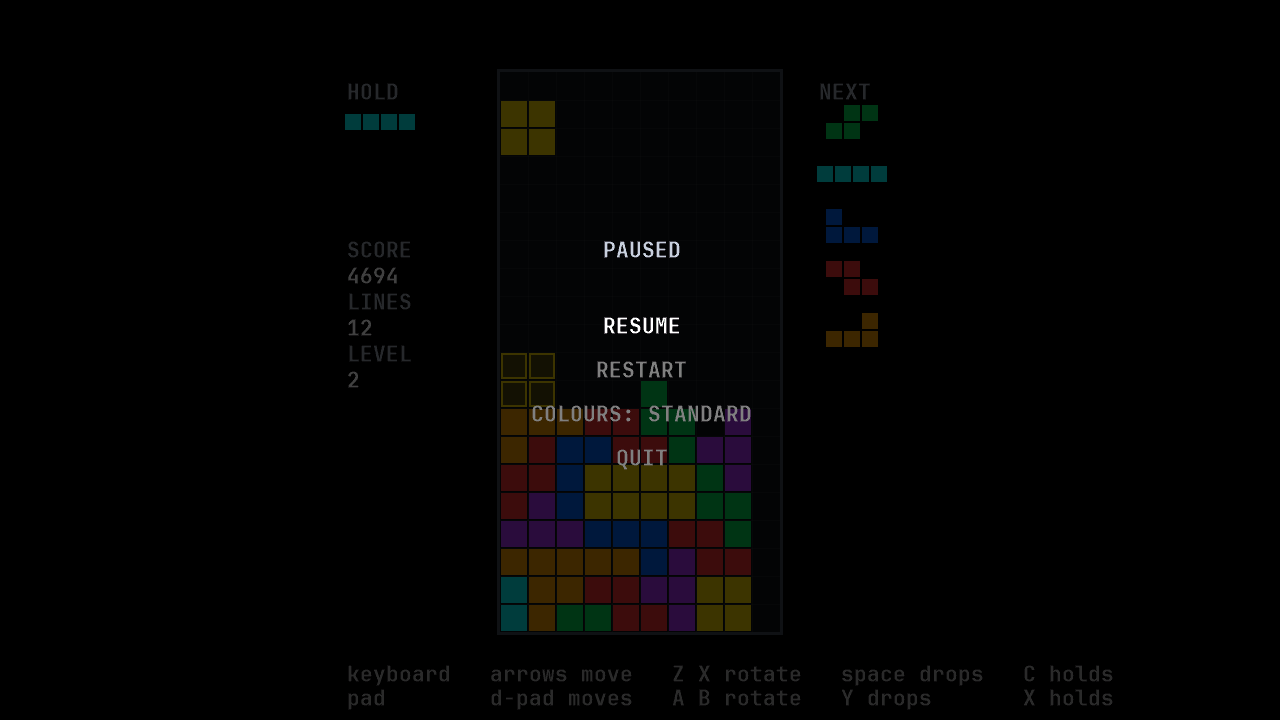
This guide follows LineSweeper’s pause menu,
states/pause_state.cpp:
four rows, Resume, Restart, Colours and Quit, over the dimmed game. A menu in your own
game is a new state in new files; if a build fails while you add it, Read a build error
shows how to read the error, and its LNK2019 entry covers a file left out of the build.
Make a title menu builds a whole menu in the starter project, step by
step, after Add a screen to your game.
The widgets
Section titled “The widgets”Widgets are game objects, so they go in a scene like anything else. The engine’s set is small:
| Widget | What it is |
|---|---|
UiText |
A line of text. |
UiTexture |
A frame from a sprite sheet, in a rectangle. |
UiContainer |
A widget holding other widgets, so a compound row can be one thing. |
Each takes a name first, which is how a container finds a child. The set is small because it is
open: a widget is a class you can derive from, and a game’s own widgets (a slider, a row with a
label and a value) are classes the game writes. It need not write those two from scratch:
samples/components has an option row and a
slider, each a header, a source file and its tests, to copy into your game and edit, and the
Examples page’s Components section shows them.
Copy the components into your game does the copy in the
starter project, step by step.
The Settings and saves guide
quotes the gallery’s real fullscreen request and re-sync, and shows how to
connect a copied volume slider to the game’s sound groups.
There is no layout engine. You position widgets yourself. The pause menu measures each row’s text and centres it, as the Sprites and text guide shows.
The focus group
Section titled “The focus group”A FocusGroup holds the widgets the cursor can land on, each with the action that runs when it is
chosen. The pause menu lists its four rows with the answer each would give; the Colours row has
none, because its action does not close the menu:
const std::array<Row, 4> rows = { { { L"RESUME", PauseChoice::resume }, { L"RESTART", PauseChoice::restart }, { colours_text(*this->palette_), std::nullopt }, { L"QUIT", PauseChoice::quit },} };samples/linesweeper/states/pause_state.cpp, lines 157–162 at f525bc6
then adds them. Three actions pop the menu with their answer; the Colours row’s action changes the palette, rewrites its own text and leaves the menu open:
for (std::size_t index = 0; index < rows.size(); ++index) { const Row& entry = rows[index];
"row", entry.text, font_name, centred(*resources, this->font_, entry.text, row_y(index)), resources));
if (!entry.choice.has_value()) { this->colours_row_ = row; this->focus_.add(row, [this]() {#if defined(LABRADOR_DEVELOPMENT_TEST_INPUT) record_test_input_result("palette");#endif this->select_palette(next_palette(*this->palette_)); }); } else { const PauseChoice choice = *entry.choice; this->focus_.add(row, [this, choice]() {#if defined(LABRADOR_DEVELOPMENT_TEST_INPUT) switch (choice) { case PauseChoice::resume: record_test_input_result("resume"); break; case PauseChoice::restart: record_test_input_result("restart"); break; case PauseChoice::quit: record_test_input_result("quit"); break; }#endif this->context()->pop(choice); }); }
this->rows_[index] = row; }samples/linesweeper/states/pause_state.cpp, lines 164–208 at f525bc6
Popping from inside an action is safe: the action runs inside the menu’s update(), and the stack
waits for that to return before it destroys the menu.
The group colours its widgets to show focus: white for the focused one, grey for the rest, dim
grey for one that is disabled, darker than an enabled unfocused row. Pass a FocusStyle to the
constructor for other colours, and call set_enabled(widget, false) to grey out a choice that is
not available.
Moving and choosing
Section titled “Moving and choosing”Each step the menu turns input into a direction, moves the focus, and activates on confirm:
void PauseState::update(float dt) {#if defined(LABRADOR_DEVELOPMENT_TEST_INPUT) TestInputStep test_step(*this->app_->keyboard(), "pause", this, [](const void* source) { const PauseState& state = *static_cast<const PauseState*>(source); int row = -1; for (std::size_t index = 0; index < state.rows_.size(); ++index) { if (state.focus_.focused(0) == state.rows_[index]) { row = static_cast<int>(index); break; } } return TestInputSnapshot{ row, static_cast<int>(*state.palette_) }; }); if (!test_step.allowed()) return;#endif this->arrange_screen();
// Cancel first, so that the key which opened the menu closes it // whatever the cursor is on. A player who paused by accident should not // have to read four rows to get back. if (this->cancel_pressed()) {#if defined(LABRADOR_DEVELOPMENT_TEST_INPUT) test_step.result("resume");#endif this->context()->pop(PauseChoice::resume); return; }
this->repeat_.update(this->held_direction(), dt);
// Up and down walk the rows. Left and right change the palette when // the cursor is on COLOURS and do nothing anywhere else: the rows are // one column, so a sideways walk could only wrap the cursor somewhere // the player did not point. if (direction == Direction::up || direction == Direction::down) { // The return value is "focus actually moved", which is the signal a // cursor sound hangs on (focus.h). This sample has no audio, so it // is deliberately ignored rather than plumbed to nothing. this->focus_.move(0, direction); } else if ((direction == Direction::left || direction == Direction::right) && this->focus_.focused(0) == this->colours_row_) { this->select_palette(direction == Direction::left ? previous_palette(*this->palette_) : next_palette(*this->palette_)); }
if (this->confirm_pressed()) { this->focus_.activate(0); } { // Focus before activation so the action belongs to the touched row. this->focus_.set_focused(0, row); this->focus_.activate(0); }
// Update this overlay's objects; the covered match is not updated. this->scene_->update(dt); this->scene_->end_tick(); }samples/linesweeper/states/pause_state.cpp, lines 317–388 at f525bc6
move(slot, direction) finds the nearest widget in that direction by looking at where the
widgets are on screen, not at the order they were added. A grid of buttons, a column and a row
all navigate correctly with no extra code, and by default moving off one edge wraps to the other.
move returns whether the focus actually moved, which is when a menu would play a cursor sound.
activate(slot) runs the focused widget’s action, and reports whether it ran, or was refused
because the widget is disabled.
The rows are one column, so the pause menu gives only up and down to move: in one column, a
sideways move could only wrap the cursor to a row the player did not point at. Left and right
instead step the palette while the cursor is on Colours, and do nothing elsewhere.
Directions come from DirectionRepeat, which turns a
held stick or key into one move at once and then repeated moves, the way menus in console games
behave. The pause menu handles cancel first, so the button that opened the menu always closes it,
whatever the cursor is on.
Choosing a row with a click or tap
Section titled “Choosing a row with a click or tap”hit_pointer_target in engine/ui/pointer_target.h compares a point with an
explicit span of PointerTarget rectangles and returns the first enabled hit’s
index, or no match. Your game reads mouse/touch input, authors the targets,
maps the point into their space, then uses the focus and activation operations.
This keeps target sizes,
input priority and pointer behavior with the game
(T1).
The query ignores targets with nonpositive dimensions or nonfinite coordinates, dimensions or computed endpoints; a nonfinite point misses. Negative origins are valid. It includes left/top edges and excludes right/bottom edges, skips disabled targets without hiding a later match, and returns indices in the original span. It performs no expansion, layout, focus change or pointer capture.
This query is in the development engine after v0.3.0. A released starter
needs the version that carries it; updating a starter
and moving an engine pin describe the two update routes.
LineSweeper’s touch helper, tapped_row(), supplies its own row bands:
{
{ if (!touch.pressed(point.id)) { continue; }
point.position, this->arrangement_.viewport);
for (size_t index = 0; index < this->rows_.size(); ++index) { const UiText* row = this->rows_[index]; const Vector2F centre = bounds.center(); const float half_width = std::max(row_tap_half_width, bounds.width * 0.5f + row_tap_margin);
targets[index] = PointerTarget{ RectangleF(centre, half_width, row_spacing * 0.5f), true }; } { return this->rows_[*hit]; } }
return nullptr;}samples/linesweeper/states/pause_state.cpp, lines 235–268 at f525bc6
It considers only a touch’s pressed edge, so holding a finger does not
activate a row every tick. Camera::world_position maps the point from client
pixels into the same space as the rows, using the camera and viewport used to
draw this menu. Refresh that arrangement before testing input after a resize.
Comparing client pixels directly with world-space bounds would choose the
wrong row when the camera fits or scales the view.
The game expands each text’s bounds() into a row target. Its half-width is
the larger of a minimum and the text’s half-width plus a margin; its height
extends half the row spacing above and below the centre. Left/top tests include
the edge; right/bottom exclude it. The
first hit returns one row, so several newly pressed points still produce at
most one choice in this call. Those sizes and that priority are sample policy.
The update then focuses the touched row before activating it:
{ // Focus before activation so the action belongs to the touched row. this->focus_.set_focused(0, row); this->focus_.activate(0);}samples/linesweeper/states/pause_state.cpp, lines 378–383 at f525bc6
set_focused(slot, row) accepts a widget already in that group and returns
false for an unknown widget. A disabled row can receive focus; activate
refuses its action. Your game can also exclude disabled rows from its hit test.
The sample checks cancel first and gives keyboard/pad confirm priority over
touch, so its input paths cannot activate twice in one update.
For a mouse, use the borrowed Application::mouse() and the left-button edge,
mouse.pressed(MouseButton::left). Its mouse.position() is an integer
position in client pixels: pass it directly to the same view’s
Camera::world_position, which returns Vector2F, and test the same row targets. Choose that view,
hover behavior and click/drag policy in game code. LineSweeper’s quoted helper
reads touch; the mouse route is how to reuse that pattern in your own menu.
Choose a row with the mouse in Make a
title menu gives the whole of it as code to paste into the starter project: a function that
returns the row under a left click, and what to build and try.
For a mouse menu, the page can also request a hand over an enabled target:
Choose that from the page’s hover/capture state, independently of its focus group. The components gallery is the running example; Pointer shapes explains the six choices, default/restoration and version boundary. This adds no engine widget policy.
A menu that answers
Section titled “A menu that answers”The pause menu returns its choice the way any pushed state does, as a typed result:
enum class PauseChoice{ resume, restart, quit,};samples/linesweeper/states/pause_state.h, lines 28–33 at f525bc6
and the play state that opened it decides what each answer means:
void PlayState::open_pause_menu(){  this->context()->push<PauseChoice>(    std::make_unique<PauseState>(this->app_, &this->palette_),    [this](const PauseChoice& choice)    {      // Before QUIT acts, so a player who changed palette and then      // quit is still reported.      if (this->palette_ != this->reported_palette_)      {        this->reported_palette_ = this->palette_;        if (this->report_palette_ != nullptr)        {          this->report_palette_(this->palette_);        }      }
      switch (choice)      {      case PauseChoice::restart:        // Assignment preserves all presentation loans into world_.        this->world_ = World{};        break;
      case PauseChoice::quit:        this->app_->quit();        break;
      case PauseChoice::resume:      default:        break;      }    });}
samples/linesweeper/states/play_state.cpp, lines 222–255 at f525bc6
Because the menu only reports a choice, the same menu could be opened from anywhere that wants those three answers. The palette is the exception: the play state lends the menu a pointer to its selection, and the menu writes it in place.
Drawing over the game
Section titled “Drawing over the game”The pause menu says covers_screen() is false, so the match keeps drawing underneath it, and its
first object is a full-screen rectangle of translucent black that dims the match. Its scene is
drawn after the match’s, so it draws on top. See
Drawing over the world.
Split-screen menus
Section titled “Split-screen menus”FocusGroup takes a number of slots, one per player, and every call names the slot it is
for. Each player has their own cursor in the same group, which is what a character-select screen
needs. The pause menu is single-player and uses slot 0 throughout.
The local-multiplayer join screen is a copyable two-player example. Each keyboard half or pad slot joins one player, then each player moves and selects READY or LEAVE independently. Its group and repeat clocks are separate:
samples/local_multiplayer/join_state.h, lines 44–45 at f525bc6
The screen uses just_connected and just_disconnected to explain pad changes and remove an
observed disconnected assignment. Joining consumes that press; it cannot also select READY.
The sample’s value-based rules
keep player binding and readiness outside the engine. Local multiplayer
explains the source-to-player mapping, controls and identity limits.
Accessibility
Section titled “Accessibility”Labrador provides keyboard, controller, mouse and touch input, UI focus and directional navigation. The default focus style distinguishes rows by brightness, and your game can supply its own colours. In the browser, Tab remains available to move focus away from the canvas. The drawn widgets and game state are not exposed to screen readers by the engine.
Your game owns layout, styling, contrast, accessibility options, and its actions and bindings, including any rebinding. Labrador has no engine action map; games can implement remappable controls through their own binding tables.
LineSweeper aims for keyboard and controller play, clear focus, readable contrast, reduced-motion options and selectable colour-vision-deficiency palettes. Its documentation states what has been verified and any remaining limitations. The sample owns these choices; other games decide their own accessibility aims.
Physical controller play still awaits the recorded hardware checks. LineSweeper’s landing shadow meets 3:1 against the empty well for every piece, checked by a test. On Windows and in a browser whose system asks for reduced motion, LineSweeper throws an eighth of the sparks from each line clear, landing and top-out, rounded up per cell.
Both entry points use the same engine query:
#include "engine/app/motion_preference.h"
Call this on the application thread. It reads Windows’ client-area animation setting or the
browser’s prefers-reduced-motion: reduce media query afresh on each call, with false when
the setting is unavailable. It installs no listener and keeps no cached preference. A game
chooses when to ask again and how a player’s explicit effects setting takes priority.
LineSweeper samples once at startup and keeps that choice through pauses and restarts; it
does not follow changes made while it is running. The engine changes no animation itself.
The pause menu’s Colours row selects a piece palette for Protanomaly / Protanopia, Deuteranomaly / Deuteranopia or Tritanomaly / Tritanopia, beside the standard one. The palettes were chosen by simulation and checked against the landing-shadow contrast and the flash criteria; no player with a colour-vision deficiency has validated them yet, and the selection is not saved. The sample’s README records the colours, the method and their limits.
Documentation for Labrador v0.4.0. Built from Labrador f525bc6 of 2026-11-17.