
Collision
The collision sample puts a blue player in an arena with grey walls, a green trigger and a purple rectangle that deliberately rejects contacts. Move into a wall to stop and slide along it; walk through the trigger to count an entry. All the code below comes from the runnable collision sample. If a build fails after you bring some of it into your own game, Read a build error shows how to read the error.
Run it
Section titled “Run it”The sample is in the engine’s folder, not in your game, and your game’s build does not make it.
In the x64 Native Tools Command Prompt, these commands go to
the engine’s folder in a starter project, configure and build there,
and start the sample. From a clone, the first line is cd /d C:\dev\Labrador instead.
Run the samples says how long each step takes, what it prints, and what
each failure means.
cd /d C:\dev\mygame\external\labradorcmake --preset x64-debugcmake --build --preset x64-debug --target CollisionSample CollisionSampleTestsout\build\x64-debug\samples\collision\CollisionSample.exeUse WASD, arrows or the left stick to move, R or gamepad Y to reset, O to show or hide shape outlines, and Escape or gamepad B to quit. Every gamepad slot counts, so a pad Windows has put in another slot, as it can after another pad is unplugged, works as one in slot 0 would; A single-player game accepts every slot explains why the starter reads all four the same way. The content is copied beside the executable, so it can start from any working directory. The whole arena fits the window when it is resized.
Walk right through the purple rectangle, stop at the grey wall, then go around the wall into the green trigger. Gold means the player measured a wall contact this tick; green means it is overlapping the trigger. The HUD shows the current contact count and how many times the player has entered the trigger. An entry also leaves a small gold marker just above the entry position for half a second. It stays there while the player moves on; the HUD counts the markers still in the scene.
Show the collision boundaries when you choose
Section titled “Show the collision boundaries when you choose”The sample’s outline overlay starts off. O toggles it in the state, and the game chooses which shapes it draws: every currently registered collision object here, including the purple rectangle whose mask rejects contacts.
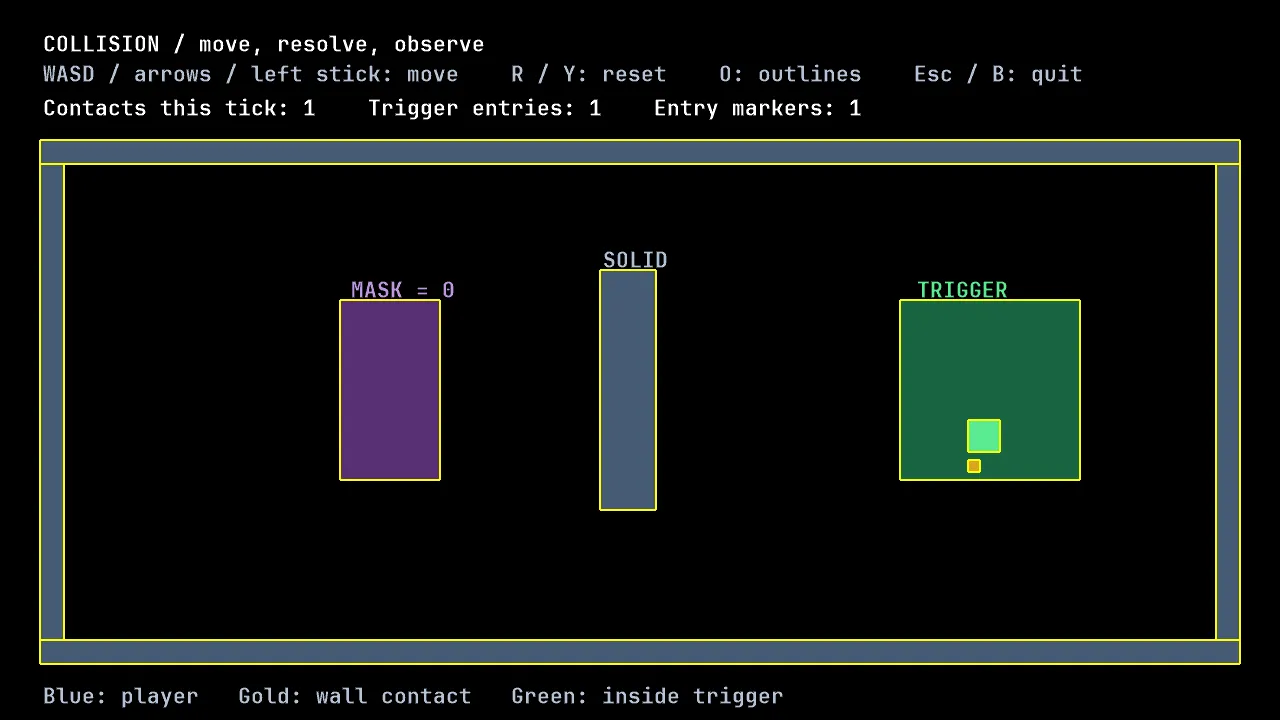
This scripted D3D11 capture shows the sample with outlines enabled. It checks one rectangle-based scene; the component’s geometry and null-recording tests cover the other supported shapes without claiming their visual acceptance.
It resolves the engine’s existing white_texture_name once, then reads shapes
in the const drawing path:
{ // The game chooses every registered collider, including mask-zero // decoration. Drawing reads the same shapes the sweep sees. { { } }}samples/collision/collision_state.cpp, lines 163–174 at f525bc6
The ShapeOutline component is game code to copy. Take
shape_outline.h,
shape_outline.cpp
and its geometry tests;
the components instructions
explain include paths, the engine-linked test target and optional null-render draw tests.
The component is added after the v0.3.0 starter. This example and its tests
use the engine revision named by the source links; use that checkout or the
release that carries it before copying. Update a starter
and Move your engine pin explain the update routes.
It supports the five shapes the narrow phase measures. Circles use an explicit 3..1024 chord count, and zero-length edges draw nothing. Thickness is in world units, not a fixed number of screen pixels. Every stroke is an ordinary white sprite quad: corners can overlap, the sprite path quantizes edges before rotation, and a small view can collapse a thin stroke. Colour, thickness, quality and visibility remain the game’s choices. No collision state changes and no engine debug overlay or filled-geometry primitive are introduced.
Give each object a shape, layer and mask
Section titled “Give each object a shape, layer and mask”CollisionObject extends GameObject: it can update and draw, and also supplies
its collision shape, layer, mask, tag and contact callback. shape() supplies
both the broad-phase box (its bounding_box()) and the geometry the narrow
phase measures; bounds() is the object’s extent for culling and layout, which
collision does not read. Here both come from the same rectangle, which is also
the sprite destination:
samples/collision/body.cpp, lines 93–94 at f525bc6
Each registered CollisionObject supplies one Shape. An ordinary
GameObject can update and draw a whole array of values, but the scene does
not discover colliders inside that array. Independently swept shapes use
separate collision objects, each handed to Scene::add in a unique_ptr.
The scene owns them; a pointer kept by the game is a loan that ends when its
object is removed, retired or destroyed with the scene. Scene offers no
borrowed registration of another object’s array elements or compound-shape
registration.
The narrow phase measures RectangleF, RectangleRotated, Triangle,
Quad and Circle, each against any other. For a round body, shape()
returns a Circle and bounds() returns its bounding_box(). A contact with
a circle has its normal through the circle’s centre, so a body that meets it
off centre slides around it. A circle whose radius is zero or less touches
nothing.
A layer is one bit. A mask is the set of layers the object accepts. The engine does not name them for you:
constexpr labrador::CollisionLayer player_layer = 1u << 0;constexpr labrador::CollisionLayer wall_layer = 1u << 1;constexpr labrador::CollisionLayer trigger_layer = 1u << 2;constexpr labrador::CollisionLayer decoration_layer = 1u << 3;samples/collision/body.h, lines 17–20 at f525bc6
Both masks must agree. The player accepts walls, triggers and decoration, but decoration accepts nothing, so walking through purple produces no contact:
CollisionMask Body::mask() const{ switch (this->kind_) { case BodyKind::player: return wall_layer | trigger_layer | decoration_layer; case BodyKind::wall: case BodyKind::trigger: return player_layer; case BodyKind::decoration: case BodyKind::entry_marker: return 0u; } return 0u;}samples/collision/body.cpp, lines 29–40 at f525bc6
tag() carries the sample’s BodyKind classification. Unlike a layer, the tag
does not filter anything; the callback reads it to choose what a contact means.
Separate walls, observe triggers
Section titled “Separate walls, observe triggers”The engine measures overlaps and calls both participants once with opposite
normals. The normal points from this object towards the other. The sample
moves the player away using separation(normal, penetration) and removes only
the velocity component into the wall using slide(velocity, normal):
{ if (this->kind_ != BodyKind::player) { return; }
if (other.tag() == static_cast<CollisionTag>(BodyKind::wall)) { this->rectangle_.x += movement.x; this->rectangle_.y += movement.y; this->touching_wall_ = true; } else if (other.tag() == static_cast<CollisionTag>(BodyKind::trigger)) { this->touching_trigger_ = true; }}samples/collision/body.cpp, lines 50–70 at f525bc6
The wall ignores its callback. A trigger marks the player’s overlap without
moving it or changing its velocity. These are game decisions: Scene::resolve
does not automatically push every pair apart.
Body::update clears the contact flags before each sweep and moves its rectangle
by velocity times dt. The same rectangle supplies collision and drawing, so
there is no second position to synchronise.
Keep the tick order visible
Section titled “Keep the tick order visible”The arena owns one Scene and keeps a borrowed pointer to its player.
Scene::add takes ownership but defers admission until end_tick; the arena
calls it once after adding its initial objects so the first frame can draw them.
Each step clamps the input direction, moves the objects, measures and responds to collisions, observes the results, and finishes the tick:
{ constexpr float move_speed = 240.0f; if (direction.length_squared() > 1.0f) { direction.normalize(); } this->player_->set_velocity(direction * move_speed); this->scene_.update(dt); this->scene_.resolve(); this->contact_count_ = this->scene_.contacts().size(); this->hit_wall_ = this->hit_wall_ || this->player_->touching_wall(); const bool in_trigger = this->player_->touching_trigger(); if (in_trigger && !this->was_in_trigger_) { ++this->trigger_entries_; this->spawn_entry_marker(); } this->was_in_trigger_ = in_trigger; this->scene_.end_tick();}samples/collision/arena.cpp, lines 33–53 at f525bc6
The trigger-entry counter compares this tick’s overlap with the previous tick’s. Staying inside does not count again; leaving and returning does. Multiple triggers would need the game’s own per-trigger membership tracking.
Read Scene::contacts() before end_tick(). Its participant pointers are
borrowed, and the list expires when the next resolve or end-tick begins. The
HUD copies just a count; it never keeps a contact pointer for the next frame.
Say how an object is retired
Section titled “Say how an object is retired”Scene::set_bounds gives the world an extent, and end_tick retires a collision
object whose shape has left it. It does that in two steps: it calls
set_for_deletion(true) on the object, then removes every object whose
for_deletion() answers true. set_for_deletion does nothing by default,
so a collidable that keeps the default is never retired, by the sweep or by
anything else that calls it. It goes on updating, drawing and colliding outside
the world, and nothing reports it.
The sample’s fixed Body geometry keeps that default. Its small
EntryMarker records the flag instead:
bool EntryMarker::for_deletion() const { return this->for_deletion_; }
void EntryMarker::set_for_deletion(bool for_deletion){ this->for_deletion_ = for_deletion;}Entering the trigger is the game’s spawn condition. After resolving the player’s contact, the arena adds a marker above the player without retaining its returned pointer:
void Arena::spawn_entry_marker(){ this->scene_.add(std::make_unique<EntryMarker>(position, this->texture_)); ++this->markers_spawned_; // Pending until step's end_tick. Its first update is next tick.}samples/collision/arena.cpp, lines 76–83 at f525bc6
The marker is pending during that step’s contact observation. Its admission at
end_tick makes it drawable; its first update and collision sweep are on the
next tick. Its layer and mask are zero, so it never changes the wall/trigger
responses. The half-second lifetime is sample policy:
void EntryMarker::update(float dt){ this->remaining_ -= dt; if (this->remaining_ <= 0.0f) { this->set_for_deletion(true); }}The arena sets no world bounds, so the timer drives ordinary retirement. The
same flag also honours a future bounds-sweep request. An object flagged during
a tick produces no further contacts in it. end_tick destroys a retired
object; pointers and references to it expire there. A callback that captured
one must stop using it after retirement. Keep copied values when the
observation must outlive the object.
The arena retains only the permanent player pointer and marker counts; reset
flags live markers and ends that tick before clearing its counters.
Verify and adapt it
Section titled “Verify and adapt it”Put collision in your game adds a wall and a box the keys move to the starter project, step by step.
cd /d C:\dev\mygame\external\labradorctest --preset x64-debug -R "^CollisionSampleTests$"start /wait "" out\build\x64-debug\samples\collision\CollisionSample.exe --smoke-testecho %errorlevel%From a clone, the first line is cd /d C:\dev\Labrador. ctest ends
100% tests passed, 0 tests failed out of 1. The sample is a Windows program, so the prompt does
not wait for it on its own: start /wait makes it wait, and the last line prints 0 when the
smoke run passed and another number when it failed. It shows no window and takes a few seconds.
The tests run the sample’s own arena without creating a window or device. They check separation, preserved tangential velocity, two-sided filtering, trigger entry and exit, deferred marker admission, lifetime retirement, reset and the route around the wall. Null-render tests also record no marker draw before admission, one after it and none after retirement. The finite smoke runs the real application hidden, loads its content, draws the scripted route and checks that the wall was hit and the trigger entered, then holds still until its marker retires before exiting.
This is discrete collision, not continuous collision detection or rigid-body physics. At the sample’s 60 Hz fixed step, its 240-unit speed moves a 32-unit player four units per tick through this particular layout. A speed limit alone does not prove arbitrary diagonal corner crossings safe. Validate your movement and geometry together; faster objects, narrow obstacles and moving-body response need their own tested policy.
Documentation for Labrador v0.4.0. Built from Labrador f525bc6 of 2026-11-17.