
Test your game
A project started from the starter project or Start your own project is tested from its first commit. It has two tests, and ctest runs them, in the x64 Native Tools Command Prompt, in the project’s folder, after a build:
cd /d C:\dev\mygamectest --preset x64-debugIt takes about a second, and ends:
Test project C:/dev/mygame/out/build/x64-debug    Start 1: MyGameTests1/2 Test #1: MyGameTests ......................   Passed    0.01 sec    Start 2: MyGameSmokeTests2/2 Test #2: MyGameSmokeTests .................   Passed    0.69 sec
100% tests passed, 0 tests failed out of 2
Total Test time (real) =   0.73 sec
A failed test says ***Failed in place of Passed, and the lines under it say why. A failed
MyGameSmokeTests prints a startup failure: line, as The start-up check
below shows, which Troubleshooting looks up by message, and
the summary ends 50% tests passed, 1 tests failed out of 2. A failed MyGameTests prints
doctest’s report; Add a rule and a test reads one line by line. If
ctest says Could not read presets, the prompt is not in the project’s folder: run the cd line
above.
MyGameTests runs the game’s rules with no window, no graphics device and no input device.
MyGameSmokeTests starts the game itself, hidden, lets it draw a few frames and quits. The first
says the game’s arithmetic is right; the second says the game still starts, which is what an
engine upgrade or a moved content file breaks first. Neither is a test framework of Labrador’s:
the first is doctest, the second is a switch in your main.cpp, and both are yours to change.
A test that does not compile fails the build, and ctest run after a failed build runs the tests
from the last build that worked, so build first and run ctest only if the build passed, as
Make a first change’s one line does.
Read a build error shows how to read the build’s error.
Rules in a library of their own
Section titled “Rules in a library of their own”A rule that asks the platform a question cannot be tested without one. The template’s way round
that is to keep everything the game decides in game\rules, taking what the devices said as plain
values, and to let the states do the talking to the engine. HelloState reads the stick and the
keys, hands them to the rules as directions, and places its label where the rules say:
this->motion_ = step_motion(this->motion_, stick_direction, keyboard_direction(keyboard), dt);samples/minimal/states/hello_state.cpp, lines 155–157 at 0f4f503
The rules are ordinary functions on ordinary values:
struct Motion{ float spin = 0.0f;};
// Pixels a second at full deflection, radians a second, and how far out the// greeting circles. Tuning, next to the rules it configures (CONVENTIONS,// Constants).inline constexpr float move_speed = 400.0f;inline constexpr float spin_speed = 1.2f;inline constexpr float orbit_radius = 24.0f;
// The direction a step moves in: the stick and the keys summed rather than// chosen between, so a desk with both can use both, and clamped to one unit.// The clamp is what makes the sum safe, and it matters alone too: the keys give// a whole unit per axis, so up-and-left is 1.41 units long and would otherwise// outrun any push of the stick by half.//// Both are in the engine's convention, +y down, with the stick's deadzone// already applied.labrador::Vector2F combined_direction(const labrador::Vector2F& stick, const labrador::Vector2F& keys);
// One step of dt seconds: the centre moved along combined_direction at// move_speed, and the spin advanced.Motion step_motion(const Motion& motion, const labrador::Vector2F& stick, const labrador::Vector2F& keys, float dt);
// Where the greeting is drawn: orbit_radius above the centre, turned about it// by the spin.labrador::Vector2F greeting_position(const Motion& motion);samples/minimal/rules/motion.h, lines 22–53 at 0f4f503
The wall is the build file, not a convention. The rules are a static library that links
LabradorMath, the engine’s maths on its own, and the compiler settings, and nothing else of the
engine. A call from game\rules into the engine’s compiled code, a window or a renderer, fails
to link, so the rules cannot start depending on a device without the build saying so. The wall
catches calls rather than includes: an engine header still compiles there, and what is inline or
constant in it links. The test
target links the rules and doctest:
add_library(MyGameRules STATIC    rules/motion.cpp)target_link_libraries(MyGameRules PUBLIC    LabradorMath    labrador_settings)
# Includes are written from the project root - "game/states/hello_state.h" -# so the directory above game/ is the include root, for the rules and for# everything that links them.target_include_directories(MyGameRules PUBLIC "${CMAKE_CURRENT_SOURCE_DIR}/..")
# The rules' tests, with doctest from vcpkg. A new test file is listed here.find_package(doctest CONFIG REQUIRED)add_executable(MyGameTests    tests/motion_tests.cpp)target_link_libraries(MyGameTests PRIVATE    MyGameRules    doctest::doctest    labrador_settings)add_test(NAME MyGameTests COMMAND MyGameTests)
website/src/walkthrough/game-CMakeLists.txt, lines 3–26 at 0f4f503
and a test is a doctest case that calls the rules and checks what came back:
TEST_CASE("a step moves the centre and turns the greeting"){
// A whole second to the right on the keys. Vector2F(1.0f, 0.0f), 1.0f); CHECK(moved.centre.x == doctest::Approx(100.0f + move_speed)); CHECK(moved.centre.y == doctest::Approx(100.0f)); CHECK(moved.spin == doctest::Approx(spin_speed));
// Before it turns, the greeting is straight above its centre, +y being // down. const Vector2F above = greeting_position(start); CHECK(above.x == doctest::Approx(100.0f)); CHECK(above.y == doctest::Approx(100.0f - orbit_radius));}samples/minimal/tests/motion_tests.cpp, lines 32–48 at 0f4f503
The cases read move_speed and orbit_radius rather than repeating their values, so retuning the
game does not break them; changing what a step does does.
Adding tests
Section titled “Adding tests”Add a rule and a test does all of this in the starter project, step by step, with a passing and a failing run.
- A new rule goes in
game\rules, and its.cppis listed inMyGameRules. A rule that needs the time, a random number or the input is handed them as arguments, the waystep_motionis handeddtand two directions. - A new test file goes in
game\testsand is listed inMyGameTests. One target holds all of them and is one ctest entry; doctest prints how many cases ran. - doctest comes from vcpkg. Your
vcpkg.jsonnames it beside the engine’s dependencies, andfind_package(doctest CONFIG REQUIRED)finds it. A project made from an older version of the page, whose manifest has nodoctest, adds"doctest"to itsdependenciesand configures again.
A whole game tested this way
Section titled “A whole game tested this way”LineSweeper, the falling-block sample, is the same wall around a complete game. Its rules are a library that links nothing but the compiler settings, and its tests play scripted games of four thousand ticks and compare the result byte for byte, with no window and no device. Its input reaches the rules as one byte per step, read from a binding table by the play state, which is the same split as the template’s: the state reads the devices, the rules see values. Its README records why it is arranged that way.
Inspect draws with the null backend
Section titled “Inspect draws with the null backend”This section is for later. It tests what a game draws without drawing it, which matters once a game has many things on screen; a game with a few labels can skip it.
It uses a second build of the game with the null renderer and null audio, which draw and play nothing and keep a record of what they were asked to do. Which renderer a build uses is chosen when it is configured, so the second build has a preset and a build folder of its own, beside the regular one you play.
-
Add the null presets. Open the presets file, in your project’s folder:
Terminal window notepad CMakePresets.jsonIf you have not changed it, press Ctrl+A and paste this whole file in its place, then save and close Notepad. It is the starter’s file with three entries added, each called
x64-debug-null: a configure preset that inherits everything fromx64-debugand asks for the null renderer and null audio, and a build and a test preset that use it.CMakePresets.json {"version": 6,"cmakeMinimumRequired": { "major": 3, "minor": 26, "patch": 0 },"configurePresets": [{"name": "base","hidden": true,"condition": {"type": "equals","lhs": "${hostSystemName}","rhs": "Windows"},"generator": "Ninja","binaryDir": "${sourceDir}/out/build/${presetName}","toolchainFile": "$env{VCPKG_ROOT}/scripts/buildsystems/vcpkg.cmake","architecture": { "value": "x64", "strategy": "external" }},{"name": "x64-debug","inherits": "base","cacheVariables": { "CMAKE_BUILD_TYPE": "Debug" }},{"name": "x64-debug-null","inherits": "x64-debug","cacheVariables": {"LABRADOR_RENDER_BACKEND": "null","LABRADOR_AUDIO_BACKEND": "null"}},{"name": "x64-release","inherits": "base","cacheVariables": { "CMAKE_BUILD_TYPE": "Release" }},{"name": "wasm-base","hidden": true,"generator": "Ninja","binaryDir": "${sourceDir}/out/build/${presetName}","toolchainFile": "$env{VCPKG_ROOT}/scripts/buildsystems/vcpkg.cmake","cacheVariables": {"VCPKG_CHAINLOAD_TOOLCHAIN_FILE": "$env{EMSDK}/upstream/emscripten/cmake/Modules/Platform/Emscripten.cmake","VCPKG_TARGET_TRIPLET": "wasm32-emscripten"}},{"name": "wasm-debug","inherits": "wasm-base","cacheVariables": { "CMAKE_BUILD_TYPE": "Debug" }},{"name": "wasm-release","inherits": "wasm-base","cacheVariables": { "CMAKE_BUILD_TYPE": "Release" }}],"buildPresets": [{ "name": "x64-debug", "configurePreset": "x64-debug" },{ "name": "x64-debug-null", "configurePreset": "x64-debug-null" },{ "name": "x64-release", "configurePreset": "x64-release" },{ "name": "wasm-debug", "configurePreset": "wasm-debug" },{ "name": "wasm-release", "configurePreset": "wasm-release" }],"testPresets": [{"name": "x64-debug","configurePreset": "x64-debug","output": { "outputOnFailure": true }},{"name": "x64-debug-null","configurePreset": "x64-debug-null","output": { "outputOnFailure": true }},{"name": "x64-release","configurePreset": "x64-release","output": { "outputOnFailure": true }},{"name": "wasm-debug","configurePreset": "wasm-debug","output": { "outputOnFailure": true }},{"name": "wasm-release","configurePreset": "wasm-release","output": { "outputOnFailure": true }}]}If you have changed the file, for example with the
x64-release-glentries from Send your game to a friend, add the threex64-debug-nullentries by hand where they are above: each goes after thex64-debugentry of its own list. Every entry in a list but the last ends with a comma after its closing}, and the last has none. -
Configure, build and test it:
Terminal window cmake --preset x64-debug-nullcmake --build --preset x64-debug-nullctest --preset x64-debug-nullThe configure makes
out\build\x64-debug-null, besideout\build\x64-debug, and builds the engine again there: 94 steps in a starter project you have not added files to, and more when your game has more source files or tests. The build took between 4 and 12 seconds on a fast desktop with every library already in vcpkg’s cache, and the folder takes 120 to 150 MB. The configure’s last lines are:Output -- Configuring done (7.4s)-- Generating done (0.1s)-- Build files have been written to: C:/dev/mygame/out/build/x64-debug-nulland the tests pass as in the regular build.
MyGameSmokeTestspasses too: the game starts with nothing drawn and no window shown.
The draw test below runs only in this build.
The recording inspector is a backend-internal, test-only interface, not a published portable render API. A consumer’s null-only tests and benchmarks may include it at their engine pin; review that source when moving the pin. This grants no exception to the engine’s backend include wall.
It exposes submitted sprites in view order, then call order: texture handles,
filter, viewport and four corners with position, UV and tint. Positions are in
view pixels, with the camera already applied; the viewport offset is separate.
Read after submit(). The renderer owns the returned vector and clears it at
the next begin_frame(), so copy entries needed across frames or its lifetime.
Make the test file and open it, in your project’s folder:
if not exist game\tests\draw_tests.cpp type nul > game\tests\draw_tests.cppnotepad game\tests\draw_tests.cppand paste this complete example into it. It creates no window,
Application, graphics API device or audio endpoint. Its texture is supplied
from memory and the null renderer records the draws. In your game, call your view’s draw with these
DrawLists and check the texture, order or geometry your presentation should
produce:
#define DOCTEST_CONFIG_IMPLEMENT_WITH_MAIN#include <doctest/doctest.h>
#include "engine/math/rectanglef.h"#include "engine/math/rectanglei.h"#include "engine/math/vector2f.h"#include "engine/render/colour.h"#include "engine/render/null/recording.h"#include "engine/render/render_resources.h"#include "engine/render/renderer.h"#include "engine/render/resource_factory.h"#include "engine/render/texture_data.h"#include "engine/render/viewport.h"
#include <vector>
using namespace labrador;
TEST_CASE("drawing preserves view order, call order and sprite state"){ renderer.create_device(nullptr, 640, 480, 2); renderer.set_resources(&resources);
texel.width = 1; texel.height = 1; texel.pixels.assign(4, 255); const TextureHandle texture = resources.resolve_texture("test:white");
renderer.begin_frame(); renderer.set_view_count(2); DrawList second = renderer.view(1); second.set_viewport(right);
// Fill view 1 first: submit still emits view 0 before view 1. first.draw_sprite(texture, source, RectangleF(10.0f, 20.0f, 8.0f, 4.0f), Colour::white, 0.0f, Vector2F::zero, SpriteFlip::none, 0.0f); first.draw_sprite(texture, source, RectangleF(30.0f, 40.0f, 3.0f, 5.0f), Colour::white, 0.0f, Vector2F::zero, SpriteFlip::none, 0.0f); renderer.submit();
// The recorder returns a reference; retain a copy for later frames. const std::vector<RecordedSprite> drawn = recorded_sprites(renderer); renderer.end_frame(); renderer.begin_frame(); CHECK(recorded_sprites(renderer).empty()); REQUIRE(drawn.size() == 3); CHECK(drawn[0].view == 0); CHECK(drawn[1].view == 0); CHECK(drawn[2].view == 1); for (const RecordedSprite& sprite : drawn) { CHECK(sprite.texture == texture); } CHECK(drawn[0].filter == TextureFilter::point); CHECK(drawn[1].filter == TextureFilter::linear); CHECK(drawn[2].filter == TextureFilter::point); CHECK(drawn[0].viewport == Viewport(0.0f, 0.0f, 640.0f, 480.0f)); CHECK(drawn[2].viewport == right); CHECK(drawn[0].corners[1].position == Vector2F(18.0f, 20.0f)); CHECK(drawn[0].corners[2].position == Vector2F(10.0f, 24.0f)); CHECK(drawn[0].corners[3].position == Vector2F(18.0f, 24.0f)); CHECK(drawn[0].corners[0].texcoord == Vector2F::zero); CHECK(drawn[0].corners[3].texcoord == Vector2F(1.0f, 1.0f)); CHECK(drawn[1].corners[0].position == Vector2F(30.0f, 40.0f)); // Corners are view-local; the viewport offset is recorded separately. CHECK(drawn[2].corners[0].position == Vector2F(1.0f, 2.0f));}With that file saved, open game\CMakeLists.txt, search for
add_test(NAME MyGameTests COMMAND MyGameTests), and paste this on the line after it, where
doctest has already been found:
if(LABRADOR_RENDER_BACKEND STREQUAL "null") add_executable(MyGameDrawTests tests/draw_tests.cpp) target_link_libraries(MyGameDrawTests PRIVATE LabradorEngine doctest::doctest labrador_settings) target_include_directories(MyGameDrawTests PRIVATE "${CMAKE_CURRENT_SOURCE_DIR}/..") add_test(NAME MyGameDrawTests COMMAND MyGameDrawTests)endif()The guard keeps this inspector-specific source out of other render builds.
List the view sources under test in this target too, or link your presentation
library. The project-root include path admits the walkthrough’s game/...
headers. The existing rules target still links only maths. Configure, build and run
the draw test from your project’s folder in the Native Tools prompt:
cmake --preset x64-debug-nullcmake --build --preset x64-debug-null --target MyGameDrawTestsctest --preset x64-debug-null -R "^MyGameDrawTests$" --output-on-failureThe test ends:
1/1 Test #2: MyGameDrawTests ..................   Passed    0.02 sec
100% tests passed, 0 tests failed out of 1
Total Test time (real) =   0.03 sec
and a plain ctest --preset x64-debug-null now runs three tests. The regular x64-debug build
does not build it, and still runs two.
Recordings prove the submitted commands and geometry. Pixel tests cover actual
rasterization; this backend produces no pixels and read_back_buffer throws
std::logic_error.
The start-up check
Section titled “The start-up check”MyGame.exe --smoke-test runs your first state in a hidden window, with the real window, device,
content and frame loop, and quits once 30 frames have been drawn, about half a second. It exits
0 when it got that far and 1 when anything threw, with the reason written to the standard error
stream instead of a message box, because nobody is there to close one. The build registers it:
add_test(NAME MyGameSmokeTests COMMAND MyGame --smoke-test)set_tests_properties(MyGameSmokeTests PROPERTIES TIMEOUT 60)website/src/walkthrough/game-CMakeLists.txt, lines 78–79 at 0f4f503
The timeout is for a loop that never draws. A missing content file fails it with the file named, as the game would on your next launch:
startup failure: No file at C:\dev\mygame\out\build\x64-debug\game\.\./fonts/jetbrains_mono_bold_16.spritefont.main.cpp does it by wrapping the first state rather than by adding a flag to it, so
HelloState has no test code in it, and when your first state is a title screen of your own,
it is wrapped the same way:
if (smoke_test){ first_state = std::make_unique<SmokeTest>(&app, std::move(first_state));}return app.run(std::move(first_state));samples/minimal/main.cpp, lines 138–143 at 0f4f503
The regular render build needs a graphics device. Debug Direct3D permits
Windows’ WARP software fallback; Release has no WARP fallback. A preset for
OpenGL or Vulkan needs a driver. On a machine without the required device,
ctest --preset <name> -E SmokeTests runs the rest. The null configure above
instead checks startup with its recording renderer.
It presses no keys, so it checks that the game starts, not that it plays. The separate draw test above inspects requests without proving device output.
Drive the game with injected keys
Section titled “Drive the game with injected keys”To get past a title screen in a smoke run after moving your pin, inject keys into the running
game. The engine reads the keyboard once per frame, before your state’s update: each key
event the window receives is held until that poll, which makes it visible to held() and,
for one frame, pressed(). A key pressed and released between two polls is never seen, so a
tap sent faster than a frame does nothing. Hold the key across at least one poll and release
it in a later one; at 60 frames a second, a hold of 100 ms spans several polls.
// For the shell or an input fixture. Changes become visible at poll().// A key pressed and released between polls has no sampled edge. Repeated// key-down events do not add presses; text accumulates separately.// Key::none, Key::count and values outside the key set are ignored.void on_key_up(Key key);engine/input/keyboard.h, lines 151–156 at 0f4f503
Two more things decide whether a key arrives. Injected keys go to the foreground window only, so bring the game forward first. And losing focus releases every held key, so a key held while another window takes focus is released at the next poll.
This script starts a game, brings its window forward, holds one key and saves the window
before and after. It sends set-1 scan codes through SendInput, which is how the Windows
window reads keys, so it presses the same physical key whatever the keyboard layout. Windows
lets a program bring a window forward only just after a key press, so it taps Alt first:
Show tools/input_drive/hold_key.ps1, 146 lines
# Starts a game, holds one key against its window long enough for the engine's# once-per-frame keyboard poll to see it, and saves the window before and after.## Labrador samples keys at the start of each frame (engine/input/keyboard.h): a# key pressed and released between two polls is never seen, so the hold spans# many frames and the release comes in a later one. Keys go in as set-1 scan# codes, which is how the Win32 window reads them, and only reach the# foreground window, so the script brings the game forward first and refuses to# continue if it cannot. Windows lets a program take the foreground only just# after a key or click, so the script taps Alt before asking for it.## From an engine checkout:# powershell -ExecutionPolicy Bypass -File tools\input_drive\hold_key.ps1 `# From a starter project, whose engine is in external\labrador:# powershell -ExecutionPolicy Bypass -File external\labrador\tools\input_drive\hold_key.ps1 `# -Exe out\build\x64-debug\game\MyGame.exe -Key Right# The pictures go to out\input-drive under the folder the command runs in.
param( [Parameter(Mandatory = $true)] [string] $Exe, [ValidateSet('Left', 'Right', 'Up', 'Down', 'Enter', 'Space', 'Escape')] [string] $Key = 'Right', [int] $HoldMilliseconds = 500, [string] $OutDirectory = 'out\input-drive')
$ErrorActionPreference = 'Stop'Add-Type -AssemblyName System.DrawingAdd-Type @'using System;using System.Runtime.InteropServices;
public static class InputDrive{ [StructLayout(LayoutKind.Sequential)] public struct KEYBDINPUT { public ushort wVk; public ushort wScan; public uint dwFlags; public uint time; public IntPtr dwExtraInfo; }
// INPUT is a tagged union whose largest member, MOUSEINPUT, makes it 40 // bytes on x64; the keyboard member starts after the 8-byte-aligned tag. [StructLayout(LayoutKind.Explicit, Size = 40)] public struct INPUT { [FieldOffset(0)] public uint type; [FieldOffset(8)] public KEYBDINPUT ki; }
[StructLayout(LayoutKind.Sequential)] public struct RECT { public int Left, Top, Right, Bottom; }
[StructLayout(LayoutKind.Sequential)] public struct POINT { public int X, Y; }
[DllImport("user32.dll", SetLastError = true)] static extern uint SendInput(uint count, INPUT[] inputs, int size); [DllImport("user32.dll")] public static extern bool SetForegroundWindow(IntPtr window); [DllImport("user32.dll")] public static extern IntPtr GetForegroundWindow(); [DllImport("user32.dll")] public static extern bool GetClientRect(IntPtr window, out RECT rect); [DllImport("user32.dll")] public static extern bool ClientToScreen(IntPtr window, ref POINT point); [DllImport("user32.dll")] public static extern bool SetProcessDPIAware();
const uint KEYEVENTF_EXTENDEDKEY = 0x0001; const uint KEYEVENTF_KEYUP = 0x0002; const uint KEYEVENTF_SCANCODE = 0x0008;
public static void Key(ushort scan, bool extended, bool up) { INPUT input = new INPUT(); input.type = 1; input.ki.wScan = scan; input.ki.dwFlags = KEYEVENTF_SCANCODE | (extended ? KEYEVENTF_EXTENDEDKEY : 0) | (up ? KEYEVENTF_KEYUP : 0); if (SendInput(1, new[] { input }, Marshal.SizeOf(typeof(INPUT))) != 1) { throw new System.ComponentModel.Win32Exception(Marshal.GetLastWin32Error()); } }}'@
# Set-1 scan codes; the arrows are the extended (E0) navigation cluster.$scans = @{ Left = @(0x4B, $true); Right = @(0x4D, $true); Up = @(0x48, $true) Down = @(0x50, $true); Enter = @(0x1C, $false); Space = @(0x39, $false) Escape = @(0x01, $false)}
# Physical pixels, so the capture rectangle matches the window at any scaling.[void][InputDrive]::SetProcessDPIAware()
function Save-Client([IntPtr] $window, [string] $path) { $rect = New-Object InputDrive+RECT [void][InputDrive]::GetClientRect($window, [ref]$rect) $origin = New-Object InputDrive+POINT [void][InputDrive]::ClientToScreen($window, [ref]$origin) $bitmap = New-Object System.Drawing.Bitmap $rect.Right, $rect.Bottom $graphics = [System.Drawing.Graphics]::FromImage($bitmap) $graphics.CopyFromScreen($origin.X, $origin.Y, 0, 0, $bitmap.Size) $bitmap.Save($path, [System.Drawing.Imaging.ImageFormat]::Png) $graphics.Dispose() $bitmap.Dispose()}
New-Item -ItemType Directory -Force $OutDirectory | Out-Null$exePath = (Resolve-Path -LiteralPath $Exe).Path$game = Start-Process -FilePath $exePath -WorkingDirectory (Split-Path $exePath) -PassThrutry { $deadline = (Get-Date).AddSeconds(10) while ($game.MainWindowHandle -eq [IntPtr]::Zero) { if ($game.HasExited -or (Get-Date) -gt $deadline) { throw 'The game showed no window.' } Start-Sleep -Milliseconds 100 $game.Refresh() } $window = $game.MainWindowHandle # A key event makes this script's input the last the system saw, which is # what lets SetForegroundWindow succeed when the script was not started # from the window in front. It reaches that window, not the game, and Alt # pressed and released alone types nothing. [InputDrive]::Key(0x38, $false, $false) [InputDrive]::Key(0x38, $false, $true) [void][InputDrive]::SetForegroundWindow($window) Start-Sleep -Milliseconds 1000 if ([InputDrive]::GetForegroundWindow() -ne $window) { throw 'The game is not the foreground window, so it would not receive the key.' }
Save-Client $window (Join-Path $OutDirectory 'before.png') $scan, $extended = $scans[$Key] [InputDrive]::Key($scan, $extended, $false) Start-Sleep -Milliseconds $HoldMilliseconds [InputDrive]::Key($scan, $extended, $true) Start-Sleep -Milliseconds 200 Save-Client $window (Join-Path $OutDirectory 'after.png') Write-Output "Held $Key for $HoldMilliseconds ms; wrote before.png and after.png to $OutDirectory."} finally { if (-not $game.HasExited) { [void]$game.CloseMainWindow() if (-not $game.WaitForExit(5000)) { $game.Kill() } }}tools/input_drive/hold_key.ps1 at 0f4f503
The script comes with the engine, so a starter project has it in external\labrador\tools.
Build the game first, then run this in the x64 Native Tools Command Prompt, in your project’s
folder, with nothing else of yours open over the game’s window:
cd /d C:\dev\mygamepowershell -ExecutionPolicy Bypass -File external\labrador\tools\input_drive\hold_key.ps1 -Exe out\build\x64-debug\game\MyGame.exe -Key RightThe game’s window opens, the greeting moves right for half a second, and the window closes again by itself, about two seconds in all. The script prints one line:
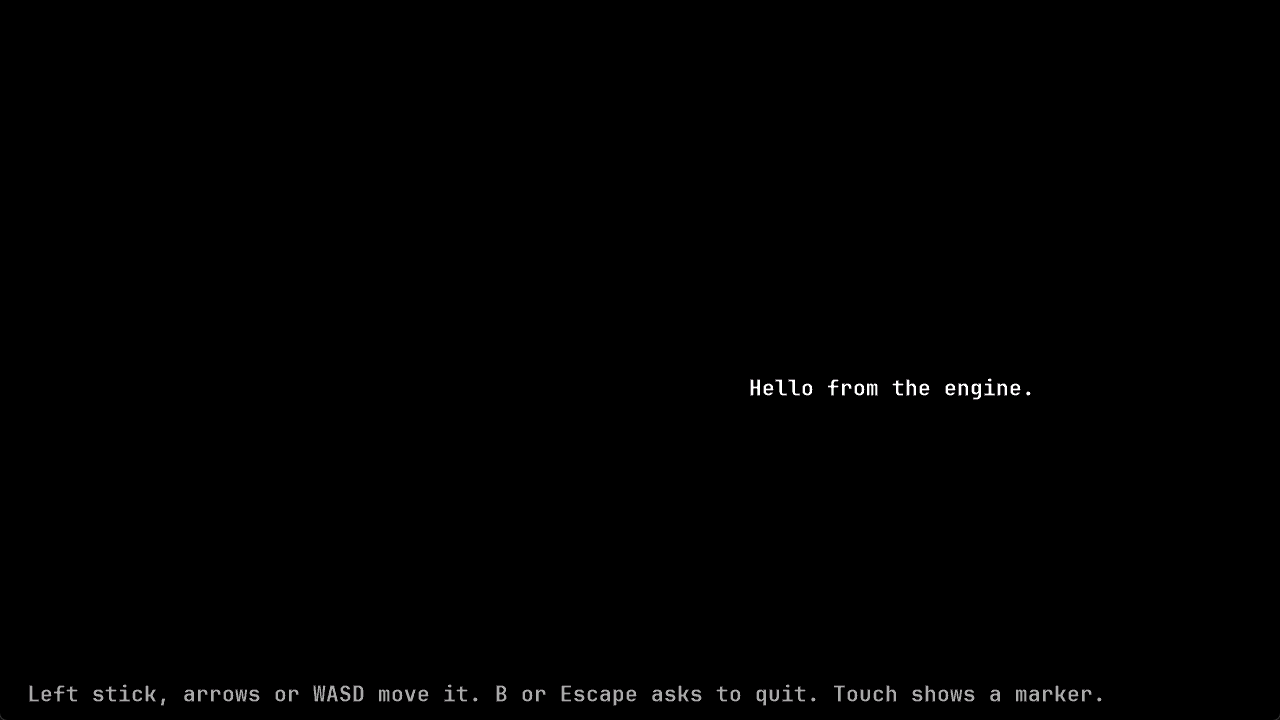
Held Right for 500 ms; wrote before.png and after.png to out\input-drive.The two pictures are the game’s window before the key and after it, in
C:\dev\mygame\out\input-drive. Open the folder with explorer out\input-drive and
double-click each to see it. Holding the right arrow for half a second moves the greeting about
200 pixels, its speed of 400 pixels a second for 0.5 seconds; the minimal sample, in an engine
checkout, looks like this:
powershell -ExecutionPolicy Bypass -File tools\input_drive\hold_key.ps1 -Exe out\build\x64-release\samples\minimal\MinimalSample.exe -Key Right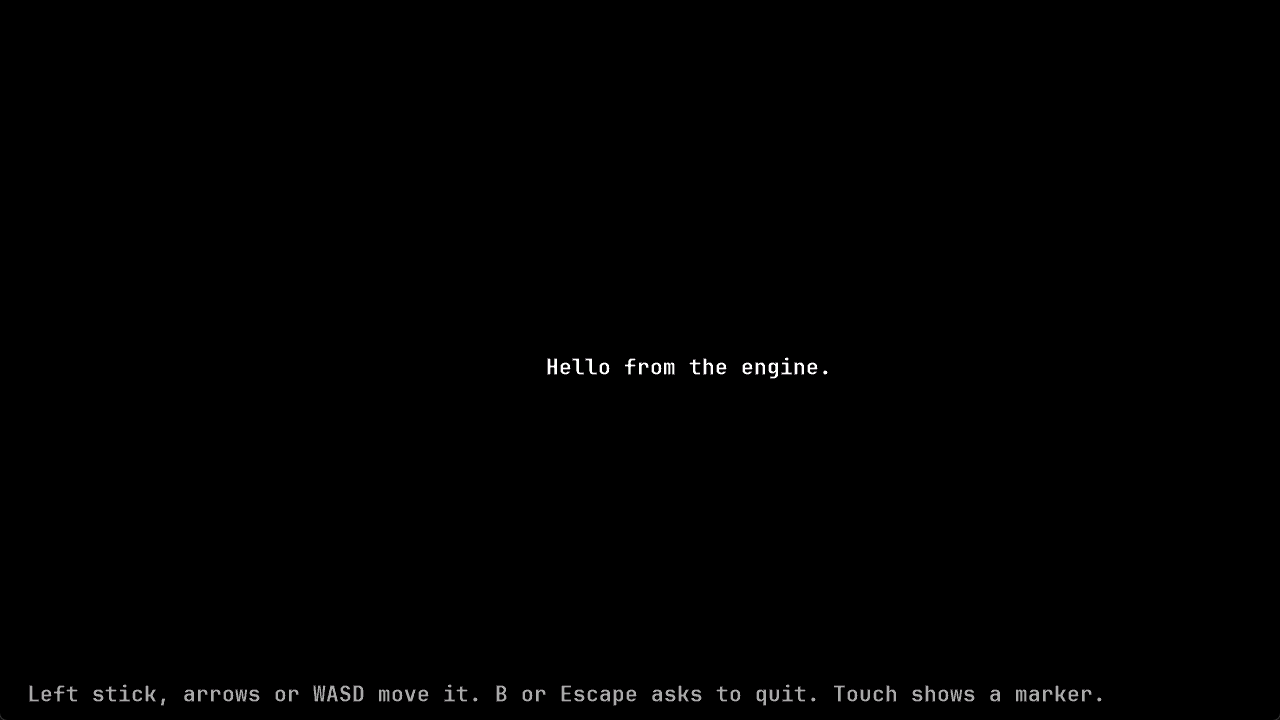
-Key takes Left, Right, Up, Down, Enter, Space or Escape. -Key Escape on the
starter’s game shows the quit question in after.png, unless you changed its quit key in
Change a control in your game. For a title screen that waits for Enter,
such as the one Add a screen to your game writes, pass
-Key Enter. -HoldMilliseconds 1000 holds the key for a second, and -OutDirectory names
another folder for the pictures. Each run replaces the two pictures.
The script is yours to change;
the engine has no replay or input-injection mechanism of its own. Labrador’s browser pages are
driven the same way through Chrome’s DevTools protocol, with real key events dispatched
through the page’s shell:
tests/app/web/window_input.mjs.
The same ctest runs on every push with the workflow in
Check your game in CI.
What was checked
Section titled “What was checked”On 31 October 2026, in a starter project made from a starter ZIP of this tree, with Visual Studio
2026’s compiler 19.51, the commands on this page ran as shown, with the project’s folder shown
as C:\dev\mygame: ctest --preset x64-debug passing, and failing with the build’s fonts
folder moved away; the whole presets file from Inspect draws,
whose configure, build and three tests passed, and the same file with the comma removed and with
the build entry pasted twice; the draw test’s file and CMake block, built and run with the
commands given, and the regular build afterwards, which still ran two tests. hold_key.ps1 ran
from the starter’s folder with -Key Right, right and Escape, and its pictures showed the
greeting moved about 200 pixels and the quit question. Run by an agent whose prompt was not the
window in front, the script before this page’s change stopped with the foreground message; with
the Alt tap it brought the game forward in each of that day’s runs but one, which stopped with
the same message and passed when run again, as the box above says to. The Q, missing-program and wrong-folder
messages were made on purpose. The pictures on this page are from an earlier run against the
engine’s own minimal sample.
A second agent then followed the page as worded in another fresh starter. The passing and
failing ctest output, the pasted presets file, the missing-comma and Duplicate preset
messages, the draw test and the regular build’s two tests, hold_key.ps1’s output, its moved
greeting and Alt tap, and its three failure messages matched. Its null build, in a starter with
no files added, ran 94 steps in about 4 seconds where the first starter’s had run 96, and its
folder was 123 MB where the first’s was 143 MB; the page now gives 94 steps and that range. It
also found that -Key Escape shows no question once the quit key is changed, which the page now
says.
A review in a third fresh starter wrote the presets file, the draw test and its CMake block
from this page’s text by script. The null configure, build and three tests passed, 96 steps with
the draw test’s two, in a 143 MB folder; the draw test alone passed, and the regular build still
ran two tests. Removing the comma gave the two errors quoted, and cmake --preset and ctest --preset from the folder above the project gave Could not read presets. hold_key.ps1 with
-Key Right, from a prompt that was not the window in front, printed its line and moved the
greeting, and -Key Q, the wrong folder and the release path gave the three messages quoted.
Documentation for Labrador v0.3.0. Built from Labrador 0f4f503 of 2026-11-03.