
Examples
The repository has six samples. They answer different questions, so they are kept separate: the minimal sample is what you copy to start a game, and LineSweeper is what you read to see what a finished one looks like. Three focused examples teach collision, audio and local multiplayer, and the components are pieces you copy one at a time. All build with the engine.
The minimal sample: the one you copy
Section titled “The minimal sample: the one you copy”samples/minimal is about 760 lines, comments and tests included. It opens a 1280×720 window with a line
of text that circles a point you move with a gamepad stick, the arrow keys or WASD. Press B or
Escape and it asks, in a second screen on top of the first, whether you really want to quit.
That is small, but it is a complete game on the engine. It has a first state, a second state pushed on top that returns a result, a scene that owns what is on screen, input from three kinds of device, content named in a manifest, rules in a library its tests run without a window, a start-up check, and the build file that copies that content beside the executable or packs it into a browser build.
| File | What it shows |
|---|---|
main.cpp |
Window options, loading the content manifest, handing the engine its first state, and --smoke-test, which runs that state hidden for 30 frames and quits. |
main_web.cpp |
The same, as a browser’s entry point, with the Application kept in a static. |
states/hello_state.cpp |
A scene with two labels and one view, input from a pad and a keyboard at once, and a marker on every touch point. |
rules/motion.cpp |
The game’s rules: two devices’ directions summed and clamped, and a transform built each step. They link the engine’s maths and nothing else of it. |
tests/motion_tests.cpp |
doctest cases that run the rules with no window and no device. |
states/confirm_state.cpp |
A state pushed above another that hands a bool back when it closes. |
content/manifest.json |
The one font the sample uses, named once and resolved to a handle at load. |
CMakeLists.txt |
The whole build file: sources, the rules library and its test, the start-up check, the engine’s two libraries, the content copied beside the executable or packed into the page, and the install rules that stage the release folder. |
This is how the minimal sample asks before quitting. The question is a state of its own that knows nothing about the screen below it, and the answer comes back once, when it closes:
if (quit_requested){ // Ask, rather than quit. The result type is named here and matched // at the pop; the question knows nothing about this state, and the // callback runs once, when it closes, rather than being a flag read // on every frame until something sets it. this->context()->push<bool>( std::make_unique<ConfirmState>(this->app_, L"Really quit?"), [this](const bool& quit) { if (quit) { this->app_->quit(); } }); return;}samples/minimal/states/hello_state.cpp, lines 131–147 at 0f4f503
LineSweeper: the one you read
Section titled “LineSweeper: the one you read”samples/linesweeper is a falling-block game with seven pieces, a next queue, a hold slot, hard
drop, wall kicks, T-spins and back-to-back scoring, and a field of up to ten thousand particles
that bursts when a piece locks, when lines clear and when the game ends. It is about 5,000 lines,
with about 2,700 more of tests, and it is there to show what a whole game on Labrador looks like
and what it costs.
Play LineSweeper in a desktop browser, before you build anything: the hosted demo downloads the game only when you click, and plays with a keyboard. Phones are a planned phase, so a phone gets a poster and a recording of the game to tap and watch, not the game itself, until real iPhone checks and the host page’s phone layout pass. Android remains unverified.
Read a description of the video
Coloured pieces turn and slide into a falling-block well. Completed rows disappear, throwing matching sparks sideways as the score and line count rise. The hold slot keeps one piece in reserve, and the next five pieces appear beside the board. Later the stack reaches the top: a “TOPPED OUT” banner appears and thousands of coloured particles burst across the screen, then fade. The game has no sound or spoken commentary.
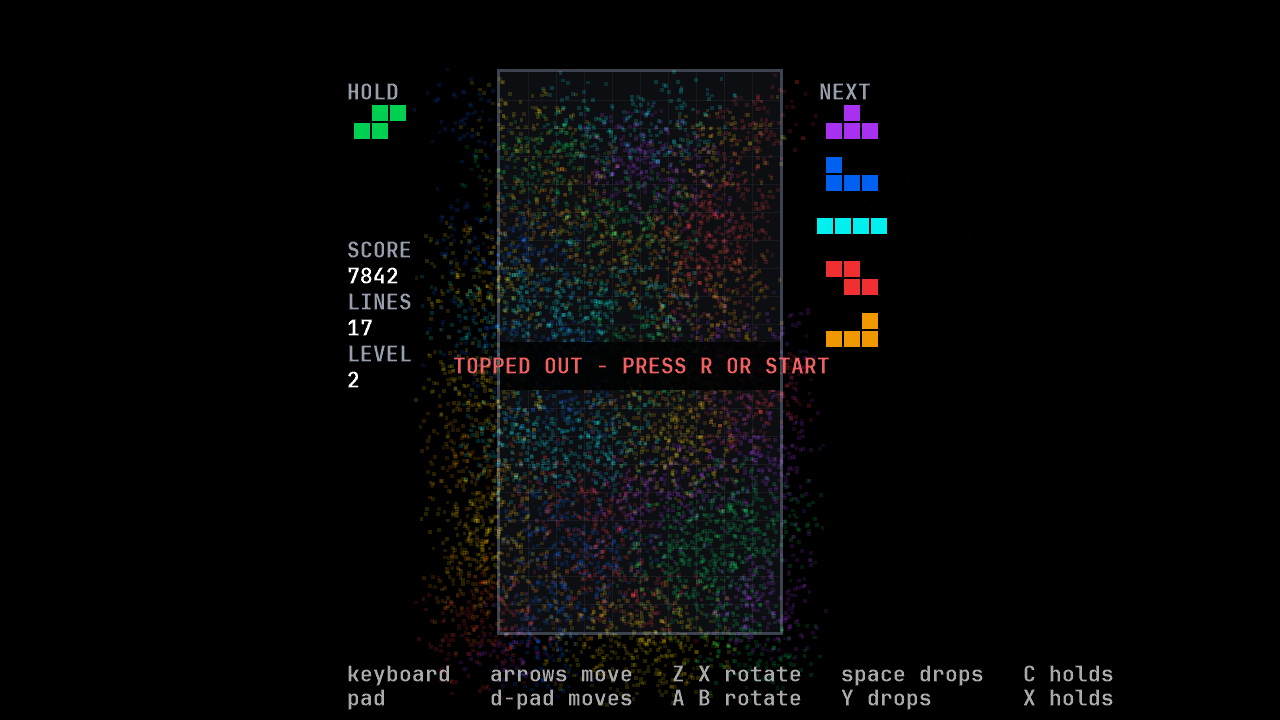
It is built in three layers, and the walls between them are the point:
rules/, the simulation: a static library that links nothing from the engine, so the whole game can be played and checked inside the test suite with no window.presentation/reads a match and draws it. It may read the rules’ data but may not call the functions that change it.states/is the only layer that sees both, and where key presses become moves.
Start with its design notes. They record every decision in the sample with its reasons, including the ones that went the other way. Then read the code in this order:
rules/world.h: the whole match as one 276-byte value, and the four compile-time checks that keep it one.rules/tick.h: the one function that advances the game by a step.tests/linesweeper/replay_tests.cpp: whole matches played, recorded and replayed with no window.presentation/particles.h: ten thousand particles behind one game object.states/play_state.cpp: keyboard and gamepad bindings, and the frame that ties the layers together.
To run the match replays from a starter project or a clone, follow LineSweeper’s match replays in Run the samples, which gives the commands, the output and the time. The rules-test commands and prerequisites are the same commands for a reader at home in the repository. They build the rules test target without the engine library, while the root configure still needs the engine’s toolchain and dependencies. The same section records the known hosts and presets.
Controls
Section titled “Controls”| Action | Keyboard | Gamepad |
|---|---|---|
| Move | Left, Right | D-pad left, right |
| Soft drop | Down | D-pad down |
| Hard drop | Up or Space | D-pad up or Y |
| Rotate clockwise | X | A |
| Rotate anticlockwise | Z | B |
| Hold | C or Shift | X or left shoulder |
| Pause | Escape or P | Start |
| Restart after the game ends | R | Start |
From the binding tables in states/play_state.cpp.
Focused guide examples
Section titled “Focused guide examples”Each example comes with a guide quoting its source, a README with controls, and automated checks of the behavior it teaches.
| Sample | What to try | Guide |
|---|---|---|
| Collision | Move into a wall, pass through masked geometry and enter a trigger. | Collision |
| Audio | Play original tones from a named sound bank and control a looping instance. | Audio |
| Local multiplayer | Move two players in a shared world through two following cameras, with WASD and arrows or two gamepads. | Local multiplayer |
Components: the pieces you copy
Section titled “Components: the pieces you copy”samples/components holds small pieces of game code: menu widgets to style and
animation playback policy to adapt. Each is a header and a source file with its
own tests, which you copy into your game and change as you like. They are not a
library, so nothing promises to keep your copy compatible,
and the engine does not know they exist. A gallery shows them all on one screen.
| Component | What it is |
|---|---|
| Option row | A label and a value picked from a fixed list with left and right, such as a difficulty or a window mode. It wraps or stops at the ends. |
| Slider | A label, a bar and a number for an integer in a range, such as a volume. It clamps at the ends and never wraps. |
| Nine-slice | One small image drawn at any size with its corners kept, such as a panel or a button background. |
| Animation preview | A value that keeps elapsed time, loops or finishes a named strip, and restarts. Drawing reads the current frame. |
A component reads no input, because bindings are your game’s decision. For
menu rows, your page moves the cursor with a FocusGroup and passes left and
right to the focused row. The gallery finds that row by comparing pointers,
since the page already holds every row it built:
{
if (focused == this->difficulty_) { return this->difficulty_->adjust(direction); }
if (focused == this->window_mode_) { return this->window_mode_->adjust(direction); }
if (focused == this->music_) { return this->music_->adjust(direction); }
if (focused == this->effects_) { return this->effects_->adjust(direction); }
return false;}samples/components/gallery_state.cpp, lines 201–226 at 0f4f503
A compound that every game ends up copying unchanged is a candidate for the engine’s widget set. One that every game edits stays a component. The components README explains the rule, and the design philosophy states it.
Playing an animation strip
Section titled “Playing an animation strip”The gallery owns two AnimationPreview values over the same original atlas:
one loops and one holds its final frame. R or gamepad X restarts both. They do
not take focus or change the settings rows. The gallery updates their clocks
once per tick, then draws them through the scene’s overlay with its fitted
camera and viewport:
{ { this->loop_preview_->draw(list, loop_preview_bounds); this->once_preview_->draw(list, once_preview_bounds); });}samples/components/gallery_state.cpp, lines 279–287 at 0f4f503
The Sprites and text guide
quotes the named strip resolution, timing policy and public frame_rect draw
path. The sample includes its DDS/JSON pair, original MIT artwork provenance,
and in-memory timing plus native-null drawing tests. Actual rendered-frame
review remains separate from those headless checks.
Running them
Section titled “Running them”The samples are in the engine’s folder, not in your game, and your game’s build does not make
them. Run the samples builds them from a starter project, in
C:\dev\mygame\external\labrador, or from a clone, where
Build Labrador has already built them. From that folder,
they are at:
out\build\x64-debug\samples\minimal\MinimalSample.exeout\build\x64-debug\samples\linesweeper\LineSweeperSample.exeout\build\x64-debug\samples\collision\CollisionSample.exeout\build\x64-debug\samples\audio\AudioSample.exeout\build\x64-debug\samples\local_multiplayer\LocalMultiplayerSample.exeout\build\x64-debug\samples\components\ComponentsGallery.exeEach copies its content beside its executable, so you can start it from anywhere. That page
also says how long the build takes, how to quit each sample and what each failure means. Under a
wasm-* preset each is a page instead, such as
out\build\wasm-debug\samples\collision\CollisionSample.html, with its content packed into
the module. Run the samples builds them for the browser
from the same folder and serves them, step by step, once
Build for the browser has installed Emscripten.
Put your game on a web host says what a host must send.
Documentation for Labrador v0.3.0. Built from Labrador 0f4f503 of 2026-11-03.